Upcoming eLearning Events


77 Articles match "Audio","Microphone"

The Latest from the eLearning Learning Community

Monday, February 8, 2010
settings for the Audio and Video setup to setup our microphone inputs. Run through the Audio Setup Wizard, and pay attention to what it is asking you to do (you shouldn't have to go into the Advanced Audio Settings). If we get good audio, there is little to no work that has to be done after our recordings! When This week's Time Saver Tuesday comes from Nick Kwiatkowski! Nick's been using Camtasia Studio to record a live event in Lansing, Michigan called IgniteLansing .
 
Monday, February 8, 2010
It does have a built-in microphone and stereo speakers so it is audio ready. The iPad then, can be used for audio-based synchronous learning, collaboration, meetings and just-in-time support. The noise about the release of Apple’s iPad has been a bit overwhelming. Were you too busy to read the reviews, analysis and opinions?
 
Friday, January 29, 2010
It’s got a moderate suite of PIM, including contacts, calendar, and notes (no ToDos, ahem), and a microphone. They’re creating the opportunity for those providers to elaborate their content with dynamic media such as video and audio, and interactive media: modifiable graphs, and of course simulations and games. Yesterday, in case you’ve been living under a rock, Apple released their take on the tablet computer, the iPad .  Steve Jobs has been quoted as saying it’s “the most important thing I’ve ever done.” 
 

The Best from the eLearning Learning Community

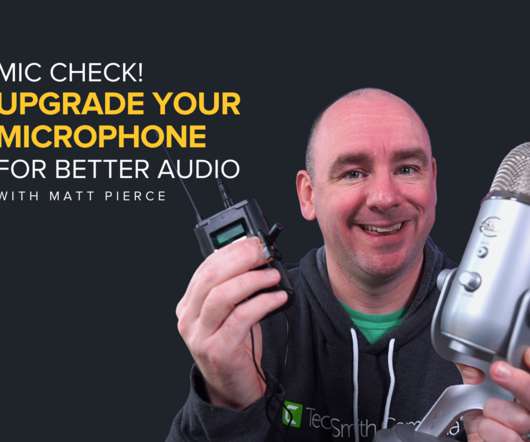
I start by going to eLearning Learning and then I search for something like audio which gets me quickly to a page that's a bunch of great posts and other items all about Audio in eLearning . The keywords on the left are highly related to audio as well, so I'll drill down to pages on Audio Voiceover or Audio Microphone . On the Audio Microphone I just saw a couple of comments on my post Recommended End of Year eLearning Tools Spending? that were asking about quality differences between a Blue Snowball mic and SHURE mics.
Ever heard the saying, 'Audio is King'? One of the most difficult parts of a screencast is getting quality audio, in my opinion. And, there have been studies that show that the quality of your audio affects your audience's perception of the quality of your presentation more than the visuals. Poor audio = people think poor presentation. Kathy Sierra has a great blog post on the effect of sound on users that you can read here . I
Wired Magazine offers some reviews on USB microphones suitable for podcasting (or eLearning narration): Audio-Technica AT2020 USB ( manufacturer’s link here ) Have a look at these latest USB microphone offerings, as well as the new Shure mics I mentioned last week . Alesis USB Mic Podcasting Kit ( manufacturer’s link here ) Marshall Electronics MXL Studio 1 ( manufacturer’s link here )
At our seminar today on using Articulate and Moodle and "Doing More for Less" , the conversation turned (as it always does) to using audio in eLearning. They had the SME record the audio for the slides. So here's to more guerilla audio recording! One of the participants talked about a focus group/research project his organization did. I don't have the specifics and I'll try to track him down to find out more because the results were fascinating.
Among these are the following: Audio fidelity will attract attention to media. Audio fidelity will affect people's memory for audio information. People will evaluate better audio fidelity differently than poorer audio fidelity. So, audio fidelity does matter. In The Media Equation by Byron Reeves and Clifford Nass (Cambridge University Press, 1996), the authors make some profound and non-intuitive assertions about the ways in which people relate to computers and TVs. I won't go into the experiments that they conducted here, but I'd thoroughly recommend
My thanks to Mike Descher of the MXL Technology Division of Marshall Electronics for providing test units of three USB microphones for my review: the Studio 1 USB , the USB.008 , and the USB.009 . First, it’s important to note that these are USB microphones, allowing you to plug them directly into your computer for audio recording - no breakout box required. I’m excited to be writing what is my first hardware review here on eQuixotic. The USB.009 is the mic I used to record the narration for my Evernote tour , which was honored with a silver in the 2009
Good audio is critical to your elearning success. But it all falls apart if the audio quality in your course is not very good. Today we’ll look at the microphone and recording environment. Invest in a good quality microphone You might be a great instructional designer and create the most engaging courses possible. In an earlier post we looked at when it makes sense to consider paying for professional narration .
In this part of the series, I won't delve too deeply into script-writing: I'll return to that subject in a later series of blog posts, but if you have a look at my series of articles on instructional design to understand my orientation on theoretical and pedagogical approaches to this activity. Today, I'm going to talk about digital audio, and the basic hardware and software you'll need to begin creating your own podcasts. As I indicated yesterday , the principles of multimedia have been understood for over 80 years, but wide usage of digitally factored technology did not begin in
Recording audio for E-learning contexts is a straightforward process when you use the right equipment and adhere to some basic steps to optimize your recording environment. ll discuss basic techniques for audio recording and highlight some equipment that will help ensure your message is communicated loud (but not too loud) and clear. Microphone When was the last time you heard a poorly recorded E-learning course, podcast or online presentation? You know of what I speak.
Personally, I have never been able to get decent results from a headset microphone. Now, professional narrators would probably never consider using a USB microphone. In an April post , I made my case for narration in eLearning. As a learner, I love it (when done right). So as a developer, I like to create narrated courses.