| | Convert + Slides |
| Page 1 of 3 | Previous | Next | I CAME, I SAW, I LEARNED JANUARY 13, 2011 PowerPoint 2010: Converting Presentations to Movies In previous versions of PowerPoint, converting presentations to movies could be a bit of a laborious task. Do a run-through of your presentation to make sure there is an adequate amount of time between slide transitions and any animation effects you may have added and make any necessary changes. The good news: In PowerPoint 2007, not only did you need to go in to Windows Movie Maker to convert your presentations to movies, but in doing so you lost any transitions or animation effects you may have added. by AJ George. Choose File > Save As. | LEARNING ROCKS NOVEMBER 7, 2011 Gamification by example - my slides After a suitable delay, here are my slides from my talk at the eLearning Network's October Converting Classroom Courses event in London. I've added a summary of what I said on each slide in the notes. Gamification by example View more presentations from Dan Roddy This was the "winning" talk on the day. | | | | | | | RAPID INTAKE NOVEMBER 21, 2011 Convert PowerPoint to Mobile Learning - How To Export your PowerPoint audio into individual WAV files and your slides into individual JPEG image files. Using the Image and Audio HTML5 template designed for mobile deployment, create a page for each slide, select the slide image and corresponding audio for each slide. To export the slides as images, click the PowerPoint menu, then click Save As. | I CAME, I SAW, I LEARNED MARCH 21, 2011 PowerPoint: Changing Slide Sizes for Importing into Captivate If you resize the PowerPoint presentation, the size of the imported slides you see in Captivate will match the width and height of your Captivate project. Converting inches to pixels isn't something most of us can do without a calculator. Changing the size of a presentation will likely result in slide object resizing and moving. by AJ George. | BOZARTHZONE MARCH 3, 2013 PowerPoint Converter for 2013 With the 2 nd edition of Better Than Bullet Points: Creating Engaging eLearning with PowerPoint (updated for PowerPoint 2013) going to press in August I’ve been busy learning PowerPoint 2013 and testing out converter tools. Conversion of even big slide shows with lots of images, animation and audio is very fast. Disclosure: I made it known that I was working on this. What I need now? | | | | | | | | | | -
INTEGRATED LEARNINGS | THURSDAY, SEPTEMBER 13, 2012 Turn These Slides into eLearning slideshow by a client, with the request to convert it into some kind of eLearning thingy? However, scenarios benefit learning in so many ways, it’s hard to justify spending time picking out Clip Art to decorate slides rather than writing even a few simple scenarios. If you have your own set of strategies for turning a stack of PowerPoint slides into an eLearning lesson, please share! By Shelley A. Gable. Ever been handed a PowerPoint. Oh…and then also told that you only have a week to get it done? Create relevant scenarios. Distinguish between critical. to the content. MORE >> -
ONLIGNMENT | MONDAY, MARCH 21, 2011 A practical guide to creating learning slide shows: part 2 – the slides In the first part of this practical guide, we reviewed the capabilities of, and applications for, packaged slide presentations as a tool for learning. In this second installment, we look in more detail at the visual element in the presentation – the slides. What your slides must achieve. If your slide show is going to be packaged with an audio narration, then your slides have very much the same function as they would do in a live presentation – they convey the visual element, while a voice delivers the words. Use your slides to tell a story. MORE >> -
INTEGRATED LEARNINGS | WEDNESDAY, AUGUST 11, 2010 Don’t Convert! Redesign Instructor-Led Training for eLearning Requests to convert existing instructor-led training (ILT) to eLearning. ve seen talented instructional designers convert ILT into eLearning as though they’re doing a straight, simple conversion. In other words, lectures become text-heavy slides, while discussion questions and activities are translated into dull knowledge checks. By Shelley A. Gable. Though eLearning isn’t new to the training field anymore, it’s still relatively new to many organizations. Sometimes even before taking a swimming lesson…or changing into a proper bathing suit. The result? Hiatt. What else? MORE >> -
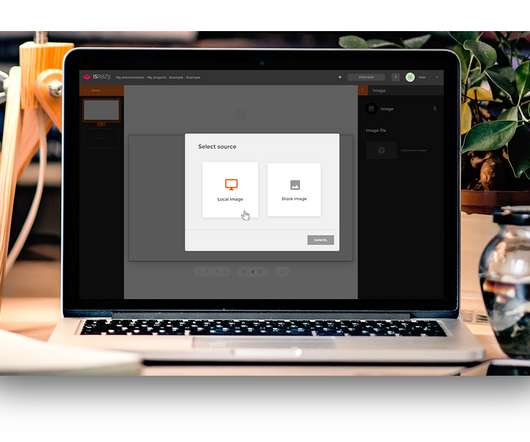
I CAME, I SAW, I LEARNED | THURSDAY, SEPTEMBER 13, 2012 PowerPoint: Converting Presentations to HTML5 with iSpring Converter But in iSpring Converter , I have finally found a PowerPoint distribution tool to really like. Here's what iSpring Converter does. The apparent functionality was created with PowerPoint triggers and actions, which cause the presentation to branch to the relevant slide. Enter iSpring Converter. am happy to report that after conversion with iSpring Converter my actions and triggers still work beautifully! iSpring Converter is free to try for a month (but adds a relatively large watermark to the converted HTML5 presentation). MORE >> -
DEVELOPER ON DUTY | TUESDAY, NOVEMBER 13, 2012 Converting PowerPoint Presentations Using Rapid Intake When the PowerPoints are loaded into the system they are converted into SWF's. While it is converting, you are still able to edit and make changes to other pages in your course so you will not need to wait for the conversion to end to continue working on other parts of your course. . Once you have selected the PowerPoint file you wish to add, you can either add one slide at a time, or the entire Power Point project at once. An individual page will be created for each PowerPoint slide if you choose to do the entire PowerPoint project at once. . Tools MORE >>
- Converting Classroom Training to E-Learning: Key Questions E-LEARNING UNCOVERED | THURSDAY, DECEMBER 13, 2012
- How to Convert Your PowerPoint Presentation into an Elearning Course RAPID ELEARNING BLOG | TUESDAY, JANUARY 27, 2009
- How to convert the toughest SME MAKING CHANGE | TUESDAY, MARCH 30, 2010
- Converting Instructor-Led Training to E-learning or Distance Learning: Keys to success BOTTOM-LINE PERFORMANCE | FRIDAY, APRIL 30, 2010
- Converting ELearning To Tablet Learning: Cost-effective Solutions UPSIDE LEARNING BLOG | THURSDAY, OCTOBER 11, 2012
- Free Webinar: Hands-on Training: Creating an HTML5 course using Adobe Captivate 5.5 and HTML5 converter TAKE AN E-LEARNING BREAK | TUESDAY, DECEMBER 13, 2011
- PowerPoint 2007: Converting Presentations to Movies I CAME, I SAW, I LEARNED | THURSDAY, DECEMBER 16, 2010
- Converting YouTube Videos in PowerPoint RAPID INTAKE | WEDNESDAY, MAY 19, 2010
- Here’s How to Convert Click & Read to Interactive E-Learning RAPID ELEARNING BLOG | TUESDAY, SEPTEMBER 25, 2012
- Efficiency in eLearning: Master Slides in Adobe Captivate 5 (Part I) LITMOS | WEDNESDAY, MARCH 16, 2011
- 5 Easy Tips to Whip Your Slides Into Shape RAPID ELEARNING BLOG | MONDAY, OCTOBER 6, 2008
- Clean Up Your Client’s PowerPoint Slides with This Time-Saving Tip RAPID ELEARNING BLOG | TUESDAY, DECEMBER 4, 2012
- PowerPoint: Sites for Slide Sharing (Say that 5 Times Fast) I CAME, I SAW, I LEARNED | FRIDAY, SEPTEMBER 21, 2012
- A practical guide to creating learning slide shows: part 4 – distribution ONLIGNMENT | TUESDAY, APRIL 5, 2011
- Case Study: Converting an Existing Course to E-Learning - 2009 - ASTD TONY KARRER DELICIOUS LINKS | TUESDAY, APRIL 21, 2009
- How to Convert Your PowerPoint Presentation into an Elearning Course RAPID ELEARNING BLOG | WEDNESDAY, JANUARY 28, 2009
- Learning Circuits Big Question: Avoiding Death by PowerPoint KAPP NOTES | WEDNESDAY, MAY 9, 2007
- PowerPoint accessibility CLIVE ON LEARNING | MONDAY, MARCH 31, 2008
- Show PowerPoint on the iPad for Free ELEARNING BROTHERS | TUESDAY, OCTOBER 25, 2011
- 2 Juicy Ways to Insert YouTube Videos into PowerPoint ZAIDLEARN | THURSDAY, AUGUST 13, 2009
- Tips for Importing from PowerPoint to Captivate INTEGRATED LEARNINGS | WEDNESDAY, MAY 2, 2012
- Why Mobile Learning Is The Future Of Workplace Learning (Infographic) UPSIDE LEARNING BLOG | TUESDAY, MARCH 5, 2013
- Rapid eLearning Tools TONY KARRER | TUESDAY, SEPTEMBER 19, 2006
- Adobe Captivate: If You Must Resize PowerPoint Presentations. Maintain! I CAME, I SAW, I LEARNED | MONDAY, MARCH 21, 2011
- Adobe Captivate 5/5.5: Switch TTS Agents in a Snap I CAME, I SAW, I LEARNED | TUESDAY, MAY 15, 2012
- Adobe Captivate 5/5.5: Template-Like Settings Without the Template I CAME, I SAW, I LEARNED | WEDNESDAY, APRIL 25, 2012
- Presentation Resources KAPP NOTES | TUESDAY, SEPTEMBER 1, 2009
- Adobe Captivate 5 & 5.5: One Simple Click. All That Stands Between You and Your Speech Agent I CAME, I SAW, I LEARNED | TUESDAY, SEPTEMBER 20, 2011
- What’s New in Captivate 6: The Little Things E-LEARNING UNCOVERED | TUESDAY, SEPTEMBER 4, 2012
- Memorable Ways to End an eLearning Course INTEGRATED LEARNINGS | WEDNESDAY, JULY 27, 2011
- Jane Bozarth: Better than Bullet Points LEARNING VISIONS | TUESDAY, AUGUST 11, 2009
- 5 Essential Rapid E-Learning Tips RAPID ELEARNING BLOG | TUESDAY, DECEMBER 8, 2009
- Now videos can be part of all elearning content! ADOBE CAPTIVATE BLOG | FRIDAY, MAY 7, 2010
- Infographics – love ‘em or hate ‘em? SPARK YOUR INTEREST | SUNDAY, OCTOBER 16, 2011
- Designboarding: Leveraging good treatment for your content - Jane Bozarth, Kevin Thorn DISCOVERY THROUGH ELEARNING | THURSDAY, NOVEMBER 3, 2011
- Digital learning content does not have to mean CBT CLIVE ON LEARNING | TUESDAY, NOVEMBER 3, 2009
- Snap! by Lectora Review INTEGRATED LEARNINGS | WEDNESDAY, JULY 6, 2011
- Virtual Learning Show Day 2 TAYLORING IT | THURSDAY, DECEMBER 6, 2012
- 3 Most Common Types of SMEs and How to Deal with Them LEARNDASH | SUNDAY, MAY 5, 2013
- New E-Learning Rankings: Authoring Tools ELEARNING 24-7 | THURSDAY, FEBRUARY 14, 2013
- eLearning Costs : eLearning Technology TONY KARRER | THURSDAY, SEPTEMBER 10, 2009
- How to Insert YouTube Videos in PowerPoint Presentations TONY KARRER DELICIOUS LINKS | MONDAY, DECEMBER 29, 2008
- Text-to-Speech Functionality in Captivate INTEGRATED LEARNINGS | MONDAY, APRIL 11, 2011
- ZaidLearn: Amazing Free e-Learning eBooks Collection ZAIDLEARN | SATURDAY, SEPTEMBER 6, 2008
- A Simple PowerPoint Technique to Make Your E-Learning Courses Look Good RAPID ELEARNING BLOG | TUESDAY, JULY 3, 2012
- QR Codes: In the Classroom #QRCode DONT WASTE YOUR TIME | FRIDAY, MAY 28, 2010
- A practical guide to creating learning scenarios: part 1 ONLIGNMENT | TUESDAY, MAY 17, 2011
- Fewer Full-Sized Courses. More learning snacks, ePubs, Videos, and Reference Tools BOTTOM-LINE PERFORMANCE | SATURDAY, FEBRUARY 9, 2013
- Cathy Moore on Saving the World from Boring eLearning LEARNING VISIONS | WEDNESDAY, SEPTEMBER 7, 2011
- Productivity tip: Quickly convert auto captions to voice over narration ADOBE CAPTIVATE BLOG | THURSDAY, JUNE 11, 2009
- Cammy Beans Learning Visions: Jane Bozarth: Better than Bullet Points LEARNING VISIONS | TUESDAY, AUGUST 11, 2009
- Adobe Captivate 6: High Fidelity PowerPoint Imports I CAME, I SAW, I LEARNED | WEDNESDAY, AUGUST 22, 2012
- Rapid Instructional Design with Powerpoint THE LEARNING GENERALIST | THURSDAY, FEBRUARY 12, 2009
- Experiences with Elearning on the Mac THE LEARNING GENERALIST | SUNDAY, APRIL 26, 2009
- Getting Granular with Twitter LEARNING WITH E'S | MONDAY, OCTOBER 11, 2010
- Adobe Captivate: FMRs Rule? I CAME, I SAW, I LEARNED | THURSDAY, JANUARY 12, 2012
- #mlearncon Creating a Mobile Strategy IN THE MIDDLE OF THE CURVE | MONDAY, JUNE 18, 2012
- ZaidLearn: A Free Learning Tool for Every Learning Problem? ZAIDLEARN | FRIDAY, JUNE 13, 2008
- EDUCAUSE Mid-Atlantic Submission IN THE MIDDLE OF THE CURVE | WEDNESDAY, JULY 28, 2010
- Text to speech in Adobe Captivate 5. ADOBE CAPTIVATE BLOG | FRIDAY, JULY 9, 2010
- Salman Khan Uses Microsoft Paint to Inspire Learning ZAIDLEARN | MONDAY, DECEMBER 29, 2008
- Text-to-Speech vs Human Narration for eLearning TONY KARRER | TUESDAY, SEPTEMBER 14, 2010
- Training: Personify Your Presentations with Adobe Presenter 8 ADOBE CAPTIVATE BLOG | TUESDAY, JULY 31, 2012
- Using Twitter to deliver a collaborative keynote JANE HART'S PICK OF THE DAY | SUNDAY, MAY 23, 2010
- Resource for Presentations KAPP NOTES | FRIDAY, SEPTEMBER 18, 2009
- #iel11 Encouraging Client Self-Sufficiency IN THE MIDDLE OF THE CURVE | WEDNESDAY, JUNE 8, 2011
- Adobe Captivate 5: WYSIWYG Placeholders I CAME, I SAW, I LEARNED | TUESDAY, NOVEMBER 16, 2010
- PowerPoint 2008 for the Mac: Inserting YouTube Videos I CAME, I SAW, I LEARNED | THURSDAY, JUNE 3, 2010
- Adobe Captivate 4: Train the Agents I CAME, I SAW, I LEARNED | MONDAY, APRIL 5, 2010
- Adobe Captivate: A Clean Break from PowerPoint I CAME, I SAW, I LEARNED | WEDNESDAY, FEBRUARY 8, 2012
- Adobe Captivate 5: External PowerPoint Changes? Avoid the Guesswork I CAME, I SAW, I LEARNED | TUESDAY, JULY 27, 2010
- 3 Ways to Use Adobe Connect INTEGRATED LEARNINGS | WEDNESDAY, NOVEMBER 7, 2012
- DevLearn 2013 Wrap Up #devlearn LEARNING VISIONS | SATURDAY, NOVEMBER 3, 2012
- M-Learning 101: I’ll Take My Rapid E-Learning to Go RAPID ELEARNING BLOG | TUESDAY, JUNE 28, 2011
- Adobe Captivate 5: Collaborating via PowerPoint I CAME, I SAW, I LEARNED | TUESDAY, SEPTEMBER 21, 2010
- Adobe Captivate: Hearing (Extra) Voices? You're Not Crazy! I CAME, I SAW, I LEARNED | TUESDAY, AUGUST 3, 2010
- Towards an alternative e-learning ONLIGNMENT | MONDAY, DECEMBER 13, 2010
- Apple, Adobe, and the Flash eLearning Future RAPID INTAKE | THURSDAY, MAY 13, 2010
- How to create a memorable mini-scenario MAKING CHANGE | WEDNESDAY, OCTOBER 12, 2011
- PowerPoint – The King of eLearning Tools? ELEARNING BROTHERS | FRIDAY, FEBRUARY 26, 2010
- DevLearn 2011 – Notes from One ID Challenge and HTML5 Authoring Tool Review E-LEARNING UNCOVERED | SATURDAY, NOVEMBER 12, 2011
- The Next Generation of E-Learning RAPID ELEARNING BLOG | TUESDAY, MAY 8, 2012
- The Guiding Principle for all Rapid E-Learners RAPID ELEARNING BLOG | TUESDAY, JUNE 12, 2012
- PowerPoint Animations Made Easy with This Free Tool RAPID ELEARNING BLOG | TUESDAY, SEPTEMBER 28, 2010
- A Free Tool & Free Graphics to Simplify Your E-Learning Course Design RAPID ELEARNING BLOG | TUESDAY, JANUARY 18, 2011
- 7 Traits an ID Must Have SPEAK OUT | MONDAY, SEPTEMBER 7, 2009
- How Can Infographics Produce Better E-Learning Courses? RAPID ELEARNING BLOG | TUESDAY, MARCH 27, 2012
- 7 Simple Rapid E-Learning Tips & Free PowerPoint Template RAPID ELEARNING BLOG | TUESDAY, OCTOBER 5, 2010
- The road is open LEARNING WITH E'S | SUNDAY, APRIL 17, 2011
| |