| | Adobe Captivate + Slides | 270 articles |
| Page 1 of 3 | Previous | Next | ICS LEARNING GROUP DECEMBER 14, 2011 Adobe Captivate Quirks We recently assisted a customer who was having difficulty with Adobe Captivate and their desired LMS reporting. Quick research showed this an issue with Captivate where; 1. Setting quiz slide responses to go to one page for a Correct response and a different page for an Incorrect response was unreliable – occasionally these quiz slides seemed to just ‘continue’ instead of branching properly. If you want users to easily retake the quiz, but in a custom button which redirects them to the proper slide. The fix : shorten the quiz slides to.5 | I CAME, I SAW, I LEARNED FEBRUARY 16, 2011 Adobe Captivate 5: New Slide, Blank Slide. What's the Deal? Take a look at the Insert menu in Adobe Captivate 5 and you'll see two similar commands: New Slide and Blank Slide. In fact, it will likely appear that New Slide and Blank Slide both result in a new, blank slide. No worries, when inserting a new slide, choose the Blank Slide menu item instead and your new slide will be blank. | | | | | | | ADOBE CAPTIVATE BLOG MAY 6, 2011 Captivate Training: Different Types of Slides in Adobe Captivate Topic: Different Types of Slides in Adobe Captivate Date and time: Thursday, June 16, 2011 9:00 AM – 10:00 AM US/Pacific Description: Join Vish and Dr. Pooja Jaisingh to learn how to use different types of slides in Adobe Captivate 5. Rapid Authoring Training and Tutorials "Elearning authoring tools" "Screen capture software" Adobe Captivate 5 Adobe Captivate 5 training Adobe eLearning Suite 2 slidesWhat’s in it for you? After attending this session, you will be able to: [.]. eLearning Suite How do I. | I CAME, I SAW, I LEARNED FEBRUARY 22, 2011 Adobe Captivate: Cue the CC's. Automatically Please Captivate 4 and 5 both come with a variable called cpCmdCC. In Adobe Captivate 5: Create a Standard Advanced Action ( Project > Advanced Actions ) as shown below. Attach the Action to the first slide. (Select Slide 1 on the Filmstrip. Below are the screen shots for the Action and attaching the action to the slide On slide enter. | ELEARNING BLENDER JULY 27, 2009 Adobe Captivate: "Continue" or "Go to next Slide." was making a stupid mistake in Adobe Captivate 3 that was seriously affecting the performance of my eLearning tutorials. When I first started using Captivate I was under a tough deadline for my first project and did not have the time to take any classes or tutorials. was confident in my skills with Powerpoint and Captivate's not that much different, right? Wrong, Captivate has different options for advancing the tutorial with action buttons and thanks to the power of Twitter , I found out I was using the wrong option. I have a confession to make. | I CAME, I SAW, I LEARNED OCTOBER 30, 2012 Adobe Captivate 6: Branch Aware Branch Aware is new in Captivate 6. According to Adobe: "Use Branch Aware to calculate the final score based only on the questions in the branch that users have viewed. don't know about you, but I find Adobe's description of Branch Aware to be confusing. On slide 1, I added three buttons. Looking to learn Captivate quickly? " Huh? | | | | | | | | | -
I CAME, I SAW, I LEARNED | MONDAY, FEBRUARY 28, 2011 Adobe Captivate & eLearning: How Long is Too Long? However, in my experience developing eLearning using Adobe Captivate, I put the attention span of an adult learner at 15-20 seconds per slide. If the slide plays any longer, your learner will begin to fog out. If your slide contains some voiceover audio, a text caption or two and an interactive object controlling navigation (such as a button or click box), 15-20 seconds is perfect. Your student will have enough time to understand and absorb the content before moving on to the next slide. Looking to learn Adobe Captivate 5? MORE >> -
I CAME, I SAW, I LEARNED | MONDAY, APRIL 19, 2010 Adobe Captivate 4: Creating Printable PDFs Publish dialog box of Captivate 4, you have probably noticed that there. Selecting this option will create a PDF version of your project without the need to use Adobe Acrobat. However, the PDF document you publish with Captivate will. If your Captivate lesson contained 50 slides, the resulting PDF you. Publish with Captivate won't contain 50 PDF document pages. video easily enough and use the Captivate playbar to move through the. only be able to print the slides contained in the PDF one slide at a time. one slide will print). MORE >> -
I CAME, I SAW, I LEARNED | TUESDAY, APRIL 19, 2011 Adobe Captivate: No More Autosizing, Thanks! Later on, when I re-opened the slide, the caption was much smaller. There was a typo flagged in that very same caption, which I naturally allowed Captivate to fix. If you resize a text caption or button in Adobe Captivate, and then edit the object's text at all, the object will do you a favor and resize. Display Captivate's Preferences (Edit menu for Windows users; Adobe Captivate menu for Mac users). With these three options disabled, Captivate will no longer resize your objects and change object timing on the Timeline. And bam! MORE >> -
I CAME, I SAW, I LEARNED | SUNDAY, JULY 31, 2011 Adobe Captivate 5 & 5.5: Export Audio received an interesting email last week from a Captivate developer asking where imported audio was physically stored on the computer. She had edited much of the audio from within Captivate and needed to share some of the edited clips with team members in her office. Once audio clips are imported into a Captivate project, they are embedded within the project and are not stored externally. From the lower left of the dialog box, select Show object level audio so that you can see all of the project's audio files (even those attached to objects on your slides). MORE >> -
I CAME, I SAW, I LEARNED | THURSDAY, SEPTEMBER 8, 2011 Adobe Captivate 5 & 5.5: That Syncing Feeling When developing eLearning with Adobe Captivate, saving unnecessary clicks is always a goal. There are two objects on a slide and they appear as blue bars on the Timeline. I'd like the top caption on the Timeline to appear on the slide just before the 1.5 could also use the Timing group on the Properties panel to control when the caption appears on the slide. Assuming that the Playhead has been positioned on the Timeline, right-click the caption on the slide and choose Sync with Playhead. Looking to learn Adobe Captivate 5 or 5.5? MORE >>
- Adobe Captivate: Closed Captions for the Slide Videos I CAME, I SAW, I LEARNED | WEDNESDAY, AUGUST 17, 2011
- Adobe Captivate 5/5.5: Wacky Shapes Rule I CAME, I SAW, I LEARNED | TUESDAY, APRIL 17, 2012
- Adobe Captivate 5/5.5: Template-Like Settings Without the Template I CAME, I SAW, I LEARNED | WEDNESDAY, APRIL 25, 2012
- Adobe Captivate: Apply Your Changes I CAME, I SAW, I LEARNED | WEDNESDAY, MARCH 28, 2012
- Efficiency in eLearning: Master Slides in Adobe Captivate 5 (Part II) LITMOS | MONDAY, MARCH 28, 2011
- Adobe Captivate 5.5: Quizzes To Write Home About I CAME, I SAW, I LEARNED | TUESDAY, JUNE 28, 2011
- Adobe Captivate 5: One Quick Way to a Project Template I CAME, I SAW, I LEARNED | TUESDAY, MAY 10, 2011
- Adobe Captivate: Hide Main Master Slide Objects I CAME, I SAW, I LEARNED | WEDNESDAY, MAY 8, 2013
- Adobe Captivate 5.5: The Pros of Contrast I CAME, I SAW, I LEARNED | WEDNESDAY, JULY 6, 2011
- Adobe Captivate: A Master Slide for All Occasions I CAME, I SAW, I LEARNED | TUESDAY, APRIL 30, 2013
- Adobe Captivate: When It Comes to Images, Choose Your Quality I CAME, I SAW, I LEARNED | TUESDAY, MARCH 15, 2011
- Adobe Captivate 5.5: Round and Round We Go. I CAME, I SAW, I LEARNED | TUESDAY, JUNE 7, 2011
- Adobe Captivate 5: Keep Audio From Getting Cut Off I CAME, I SAW, I LEARNED | TUESDAY, FEBRUARY 1, 2011
- Adobe Captivate 5/5.5: Join Objects in a Snap I CAME, I SAW, I LEARNED | TUESDAY, APRIL 10, 2012
- Captivate Training: Project Templates and Master Slides in Adobe Captivate 5 ADOBE CAPTIVATE BLOG | TUESDAY, APRIL 12, 2011
- Efficiency in eLearning: Master Slides in Adobe Captivate 5 (Part I) LITMOS | WEDNESDAY, MARCH 16, 2011
- Adobe Captivate: Export Audio I CAME, I SAW, I LEARNED | WEDNESDAY, DECEMBER 7, 2011
- Adobe Captivate 5 & 5.5: Add Some Status to Your TOC I CAME, I SAW, I LEARNED | WEDNESDAY, AUGUST 10, 2011
- Adobe Captivate 5 -- Simulations on Tap LITMOS | SUNDAY, FEBRUARY 20, 2011
- Power of Closed Captions for the Slide Videos ADOBE CAPTIVATE BLOG | SUNDAY, AUGUST 14, 2011
- Adding custom navigation buttons to imported PowerPoint slides ADOBE CAPTIVATE BLOG | TUESDAY, OCTOBER 5, 2010
- Adobe Captivate: Slide Numbering Made Easy I CAME, I SAW, I LEARNED | TUESDAY, AUGUST 24, 2010
- Adobe Captivate 5.5: Lowering the Size of Published SWFs I CAME, I SAW, I LEARNED | TUESDAY, NOVEMBER 1, 2011
- Adobe Captivate 5: Get the TOC Out of the Way with an Overlay I CAME, I SAW, I LEARNED | TUESDAY, JANUARY 25, 2011
- Up by the Bootstraps: Adobe Captivate 5 and Microsoft PowerPoint LITMOS | THURSDAY, MARCH 3, 2011
- Adobe Captivate 5: Two-Bits for the Best Rate I CAME, I SAW, I LEARNED | TUESDAY, DECEMBER 21, 2010
- Adobe Captivate: If You Must Resize PowerPoint Presentations. Maintain! I CAME, I SAW, I LEARNED | MONDAY, MARCH 21, 2011
- Adobe Captivate 5: Make Quick Work Out of Adding Audio to a Project I CAME, I SAW, I LEARNED | TUESDAY, DECEMBER 14, 2010
- Adobe Captivate 6: When It Comes to Video Color Mode, Every Bit Counts I CAME, I SAW, I LEARNED | THURSDAY, NOVEMBER 8, 2012
- Adobe Captivate: Troubleshooting LMS Woes I CAME, I SAW, I LEARNED | THURSDAY, FEBRUARY 16, 2012
- Adobe Captivate 6: Become a Groupie! I CAME, I SAW, I LEARNED | TUESDAY, JULY 17, 2012
- Adobe Captivate 5 & 5.5: Change the Mouse Pointer Project-Wide I CAME, I SAW, I LEARNED | TUESDAY, AUGUST 16, 2011
- Adobe Captivate: Custom Cursors Anyone? I CAME, I SAW, I LEARNED | TUESDAY, MARCH 20, 2012
- Adobe Captivate Question: Can I Apply to All? I CAME, I SAW, I LEARNED | FRIDAY, MARCH 25, 2011
- Adobe Captivate 6: Smart Shapes I CAME, I SAW, I LEARNED | WEDNESDAY, AUGUST 1, 2012
- Adobe Captivate 5: Keep Master Slide Backgrounds at Bay I CAME, I SAW, I LEARNED | TUESDAY, MAY 17, 2011
- Adobe Captivate 6: Placeholder Objects on Master Slides I CAME, I SAW, I LEARNED | WEDNESDAY, AUGUST 8, 2012
- Adobe Captivate: Using Aggregator I CAME, I SAW, I LEARNED | TUESDAY, SEPTEMBER 14, 2010
- Adobe Captivate 6: Question Slide Partial Scores I CAME, I SAW, I LEARNED | THURSDAY, JANUARY 10, 2013
- Adobe Captivate: FMRs Rule? I CAME, I SAW, I LEARNED | THURSDAY, JANUARY 12, 2012
- Patch for Adobe Captivate 5 to resolve Upgrade related issues ADOBE CAPTIVATE BLOG | TUESDAY, AUGUST 24, 2010
- Adobe Captivate 6: High Fidelity PowerPoint Imports I CAME, I SAW, I LEARNED | WEDNESDAY, AUGUST 22, 2012
- Adobe Captivate 5/5.5: Save and Share Effects I CAME, I SAW, I LEARNED | TUESDAY, MAY 1, 2012
- Adobe Captivate 6: Goodbye Quiz Playbar I CAME, I SAW, I LEARNED | WEDNESDAY, SEPTEMBER 19, 2012
- Adobe Captivate & RoboHelp: Incorporate eLearning within a Help System I CAME, I SAW, I LEARNED | TUESDAY, MAY 14, 2013
- HD Videos within a regular Adobe Captivate project ADOBE CAPTIVATE BLOG | TUESDAY, JUNE 26, 2012
- Adobe Captivate 5/5.5: It's Alive. Preview I CAME, I SAW, I LEARNED | TUESDAY, MAY 8, 2012
- Adobe Captivate 6: What a Character! I CAME, I SAW, I LEARNED | TUESDAY, JUNE 26, 2012
- Adobe Captivate: FMRs With all the Trimmings I CAME, I SAW, I LEARNED | TUESDAY, JANUARY 17, 2012
- Adobe Captivate: A Clean Break from PowerPoint I CAME, I SAW, I LEARNED | WEDNESDAY, FEBRUARY 8, 2012
- Articulate, Captivate, Both, or.? ELEARNING BLENDER | TUESDAY, JANUARY 19, 2010
- Adobe Captivate 5 & 5.5: Blur it Baby I CAME, I SAW, I LEARNED | WEDNESDAY, AUGUST 3, 2011
- Adobe Captivate: Repurpose Preferences I CAME, I SAW, I LEARNED | TUESDAY, MAY 21, 2013
- Adobe Captivate: Anchors Away? I CAME, I SAW, I LEARNED | MONDAY, AUGUST 16, 2010
- Adobe Captivate 5: One Masterful Slide I CAME, I SAW, I LEARNED | MONDAY, JUNE 7, 2010
- Adobe Captivate 5.5: Show For the Rest of the Project. Or Not I CAME, I SAW, I LEARNED | TUESDAY, JULY 12, 2011
- Adobe Captivate 5: WYSIWYG Placeholders I CAME, I SAW, I LEARNED | TUESDAY, NOVEMBER 16, 2010
- Adobe Captivate: Saving Changes to Object Styles I CAME, I SAW, I LEARNED | TUESDAY, FEBRUARY 28, 2012
- Guerrilla-style Rapid Development with Adobe Captivate, Part I LITMOS | THURSDAY, APRIL 14, 2011
- Adobe Captivate: Update Image Usage Project-Wide I CAME, I SAW, I LEARNED | TUESDAY, NOVEMBER 15, 2011
- Adobe Captivate: Say Goodbye to the Mouse Click Sound I CAME, I SAW, I LEARNED | TUESDAY, DECEMBER 13, 2011
- Course Companion for Adobe Captivate 6 ADOBE CAPTIVATE BLOG | TUESDAY, JUNE 19, 2012
- Adobe Captivate: Text Entry That Sticks Around I CAME, I SAW, I LEARNED | TUESDAY, FEBRUARY 19, 2013
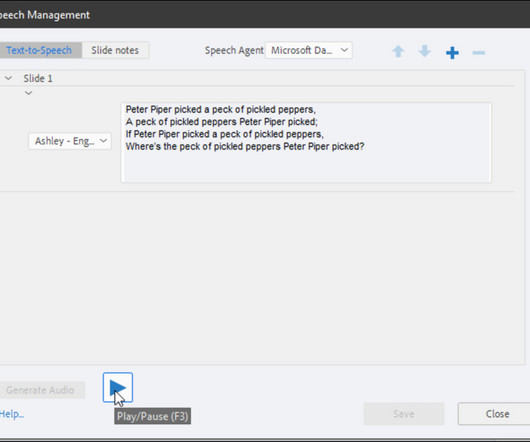
- Adobe Captivate 5/5.5: Switch TTS Agents in a Snap I CAME, I SAW, I LEARNED | TUESDAY, MAY 15, 2012
- Adobe Captivate 5/5.5: Setting a Default Object Style I CAME, I SAW, I LEARNED | WEDNESDAY, MAY 30, 2012
- Adobe Captivate: Round-Trip Your Background Image Edits I CAME, I SAW, I LEARNED | TUESDAY, MARCH 19, 2013
- Adobe Captivate 5: Republish and Wait? Not Anymore! I CAME, I SAW, I LEARNED | TUESDAY, NOVEMBER 9, 2010
- Top 70 eLearning Articles - Hot Topics: iPad Adobe Captivate - July 2010 ELEARNING LEARNING POSTS | TUESDAY, AUGUST 3, 2010
- Adobe Captivate 5 & 5.5: One Simple Click. All That Stands Between You and Your Speech Agent I CAME, I SAW, I LEARNED | TUESDAY, SEPTEMBER 20, 2011
- Adobe Captivate 6: A Production Tip That'll Save You Time I CAME, I SAW, I LEARNED | TUESDAY, DECEMBER 11, 2012
- Adobe Captivate: Smart Shapes as Interactive Buttons I CAME, I SAW, I LEARNED | TUESDAY, MARCH 26, 2013
- Adobe Captivate: Create Object Styles on the Fly I CAME, I SAW, I LEARNED | MONDAY, MARCH 5, 2012
- Comparing Adobe Captivate 4 to Adobe Captivate 5 ADOBE CAPTIVATE BLOG | FRIDAY, AUGUST 6, 2010
- Adobe Captivate: Methods for Attaching Voiceover Audio I CAME, I SAW, I LEARNED | THURSDAY, FEBRUARY 7, 2013
- WARNING: Adobe Captivate’s Worst Feature… LEARNDASH | FRIDAY, APRIL 20, 2012
- Adobe Captivate 5.5: The Fastest Angle Remover in the West I CAME, I SAW, I LEARNED | WEDNESDAY, SEPTEMBER 28, 2011
- Let the image dance for your tunes… Image Slideshows with audio using Adobe Captivate 5.5 ADOBE CAPTIVATE BLOG | SATURDAY, FEBRUARY 11, 2012
- Adobe Captivate: Edit Mouse Points in a Video Demo I CAME, I SAW, I LEARNED | WEDNESDAY, APRIL 3, 2013
- Adobe Captivate 5: Affected by Effects I CAME, I SAW, I LEARNED | TUESDAY, JUNE 1, 2010
- Free Webinar: Hands-on Training: Creating an HTML5 course using Adobe Captivate 5.5 and HTML5 converter TAKE AN E-LEARNING BREAK | TUESDAY, DECEMBER 13, 2011
- Adobe Captivate: URLs to New Windows I CAME, I SAW, I LEARNED | WEDNESDAY, FEBRUARY 27, 2013
- Adobe Captivate 6: The Theme for Today is Consistency! I CAME, I SAW, I LEARNED | TUESDAY, JULY 24, 2012
- Adobe Captivate 5: External PowerPoint Changes? Avoid the Guesswork I CAME, I SAW, I LEARNED | TUESDAY, JULY 27, 2010
- Adobe Captivate 5: Of Images and Image Slides I CAME, I SAW, I LEARNED | TUESDAY, OCTOBER 12, 2010
- Captivate Training: Amazing Image Slideshows with Adobe Captivate 5 ADOBE CAPTIVATE BLOG | FRIDAY, MAY 6, 2011
- Adobe Captivate 5: One Spelling Option Not To Ignore I CAME, I SAW, I LEARNED | MONDAY, NOVEMBER 22, 2010
- Adobe Captivate: Analyze and Chart Quiz Data Without an LMS I CAME, I SAW, I LEARNED | TUESDAY, AUGUST 31, 2010
- Adobe Captivate 6: Best Practices for Creating Compliant eLearning I CAME, I SAW, I LEARNED | TUESDAY, NOVEMBER 27, 2012
- Adobe Captivate: Export and Share Audio and Images I CAME, I SAW, I LEARNED | TUESDAY, FEBRUARY 12, 2013
| |