| | Captivate | 1672 articles |
| Page 1 of 17 | Previous | Next | IN THE MIDDLE OF THE CURVE AUGUST 21, 2009 Tackling a New Captivate Project the request of the Manager.How Wendy tackle's a new Captivate project! This process assumes: - Yes, we need a Captivate tutorial on this and not something simpler like a PDF. Note : Editing Captivate while accessing the file from a network drive invites bad juju. to ensure that you are working with the Captivate file directly from your PC. Wendy's "How to" for Captivate. | INTEGRATED LEARNINGS JULY 22, 2010 Hiding your skin in Captivate 5 About a year ago, I posted instructions on using Captivate’s system variables to turn the Captivate skin on and off within your course. Now that Captivate 5 is available, I revisited this functionality and was pleased to find that the steps to do this in the new version have been streamlined. Many designers include assessments within their Captivate lessons. Reason #1. | | | | | | | ELEARNING BROTHERS JULY 11, 2011 Captivate Templates Announcing…Captivate 5 Templates! Use our Captivate screen layouts and master slides to quickly build stunning online content. These Captivate Templates are a perfect addition to your eLearning toolbox. Available for Captivate 5 and 5.5 Check out the Captivate Templates ! eLearning Featured captivate elearning templatesScreen Layouts. Quiz layouts. | I CAME, I SAW, I LEARNED MARCH 21, 2011 PowerPoint: Changing Slide Sizes for Importing into Captivate If you plan to import a PowerPoint presentation into Adobe Captivate, it's a good idea to first resize the PowerPoint presentation from within PowerPoint. If you resize the PowerPoint presentation, the size of the imported slides you see in Captivate will match the width and height of your Captivate project. " Captivate PowerPointby AJ George. | ELEARNING BLENDER MARCH 7, 2010 Using SCORM with Adobe Captivate and Moodle If you are thinking about using Moodle and Adobe Captivate together one of the first things you need to take into consideration is the use of SCORM. Both Moodle and Adobe Captivate are SCORM 1.2 It means that you can create an eLearning tutorial with Adobe Captivate that will communicate the users scores and other information to the gradebook in Moodle. This post answers one of my most frequently asked questions from blog readers by walking you through the steps of using a SCORM based Adobe Captivate tutorial in Moodle. and 2004 compatible. What does this mean? | I CAME, I SAW, I LEARNED JANUARY 4, 2011 Link of the Week Infosemantics has created a nifty Drag and Drop question widget for Adobe Captivate. According to Rod Ward of Infosemantics , the widget "allows you to create your own drag and drop questions using almost any objects you can add to a Captivate screen." " Rod said that the widget works in Adobe Captivate 4 and Adobe Captivate 5. CaptivateTo learn more, click here. | | | | | | | | | -
INTEGRATED LEARNINGS | SUNDAY, FEBRUARY 14, 2010 How to Create Custom Buttons in Captivate Buttons are an important part of your organization's standard look and feel and you want to use your design in Captivate. Create custom versions of your button for each Captivate button state and import them using the Button object. Note: these directions are written for Captivate 4 but may work in previous versions as well ). You can reuse button graphics you have created in other programs in Captivate. Captivate has three button states you need to understand: up, over, and down. Captivate will expect the buttons to follow a standard naming convention. MORE >> -
I CAME, I SAW, I LEARNED | SUNDAY, JULY 31, 2011 Adobe Captivate 5 & 5.5: Export Audio received an interesting email last week from a Captivate developer asking where imported audio was physically stored on the computer. She had edited much of the audio from within Captivate and needed to share some of the edited clips with team members in her office. Once audio clips are imported into a Captivate project, they are embedded within the project and are not stored externally. Looking to learn Adobe Captivate 5 or 5.5? Adobe's Technical Communication Suite Captivateby Kevin Siegel. Select some or all of the audio files. Click the Export button. MORE >> -
I CAME, I SAW, I LEARNED | TUESDAY, APRIL 12, 2011 Adobe Captivate: Internalize or Externalize? The common way to publish a completed Captivate eLearning video is as a SWF (small web file). But it is possible to publish your Captivate video so that the Skin, Widgets, FMR's and Animations are split apart from the SWF. However, I have heard from more than one Captivate developer that they have been asked to do so to keep the size of the main SWF down; or maybe it is a requirement before uploading the video. The Captivate Preferences dialog box will open. Looking to learn Adobe Captivate 5? by Kevin Siegel. MORE >> -
I CAME, I SAW, I LEARNED | TUESDAY, MAY 31, 2011 Adobe Captivate 5.5: YouTube Anyone? by Kevin Siegel Adobe announced the immediate availability of Adobe Captivate 5.5 If you are a veteran Captivate 5 developer, you'll appreciate that the 5.5 For instance, if you take a look at the main toolbar at the top of the Captivate window, you'll see a new Publish To YouTube command button. Looking to learn Adobe Captivate? Adobe's Technical Communication Suite Captivate eLearninglate last week. Over the next few weeks, I'll be spotlighting some of the new features here. version looks almost identical to version 5. And that's it. MORE >> -
LEARNING DEVELOPMENTS | THURSDAY, MAY 10, 2012 Enhancing Captivate Development with PowerPoint But I do e-learning development and the tool I am using most often these days is Adobe Captivate. For example, I use PowerPoint to create transparent PNGs ( see my post from another blog ) that I can use in my Captivate projects. Captivate can be used to import PowerPoint presentations ( see my post from another blog ) saving you the work of cutting and pasting or redeveloping parts of the training. Storyboard e-learning Captivate Graphics PowerPointThose are just a few reasons I like it. still leverage PowerPoint whenever I can. Is PowerPoint one of your tools? MORE >>
- Adobe Captivate: Pre-Edit Your Text Captions I CAME, I SAW, I LEARNED | WEDNESDAY, MARCH 9, 2011
- Adobe Captivate 5: Don't Quote Me! I CAME, I SAW, I LEARNED | WEDNESDAY, JANUARY 12, 2011
- Adobe Captivate 5: One Quick Way to a Project Template I CAME, I SAW, I LEARNED | TUESDAY, MAY 10, 2011
- Adobe Captivate: Cue the CC's. Automatically Please I CAME, I SAW, I LEARNED | TUESDAY, FEBRUARY 22, 2011
- Integrating Adobe Captivate eLearning with Adobe FrameMaker I CAME, I SAW, I LEARNED | TUESDAY, AUGUST 9, 2011
- Adobe Captivate, TechSmith Camtasia Studio, Articulate Storyline: Production Times I CAME, I SAW, I LEARNED | TUESDAY, MARCH 12, 2013
- Adobe Captivate 5.5: At Long Last. Publish Support for Apple Mobile Devices I CAME, I SAW, I LEARNED | TUESDAY, JUNE 14, 2011
- Adobe Captivate 5/5.5: Wacky Shapes Rule I CAME, I SAW, I LEARNED | TUESDAY, APRIL 17, 2012
- Adobe Captivate: Create a Drag and Drop Jigsaw Puzzle I CAME, I SAW, I LEARNED | FRIDAY, SEPTEMBER 9, 2011
- Adobe Captivate: The Case of the Missing Widgets I CAME, I SAW, I LEARNED | TUESDAY, MARCH 29, 2011
- Best of Both Worlds: Integrating Adobe Captivate and Articulate Presenter ELEARNING BLENDER | WEDNESDAY, MAY 26, 2010
- Adobe Captivate & eLearning: How Long is Too Long? I CAME, I SAW, I LEARNED | MONDAY, FEBRUARY 28, 2011
- HTML 5 Converter for Adobe Captivate In the Works I CAME, I SAW, I LEARNED | WEDNESDAY, SEPTEMBER 14, 2011
- Adobe Captivate 5 & 5.5: Add Some Status to Your TOC I CAME, I SAW, I LEARNED | WEDNESDAY, AUGUST 10, 2011
- Adobe Captivate 5 & 5.5: That Syncing Feeling I CAME, I SAW, I LEARNED | THURSDAY, SEPTEMBER 8, 2011
- Adobe Captivate 5.5: Quizzes To Write Home About I CAME, I SAW, I LEARNED | TUESDAY, JUNE 28, 2011
- Adobe Captivate: Round-Trip Your Background Image Edits I CAME, I SAW, I LEARNED | TUESDAY, MARCH 19, 2013
- Captivate and RoboHelp Books Now on the Amazon Kindle I CAME, I SAW, I LEARNED | THURSDAY, MARCH 31, 2011
- Adobe Captivate Question: Can I Apply to All? I CAME, I SAW, I LEARNED | FRIDAY, MARCH 25, 2011
- Adobe Captivate 5/5.5: Template-Like Settings Without the Template I CAME, I SAW, I LEARNED | WEDNESDAY, APRIL 25, 2012
- Adobe Captivate 5.5: Round and Round We Go. I CAME, I SAW, I LEARNED | TUESDAY, JUNE 7, 2011
- Adobe Captivate 5.5: The Pros of Contrast I CAME, I SAW, I LEARNED | WEDNESDAY, JULY 6, 2011
- Adobe Captivate: Closed Captions for the Slide Videos I CAME, I SAW, I LEARNED | WEDNESDAY, AUGUST 17, 2011
- Adobe Captivate 4: Creating Printable PDFs I CAME, I SAW, I LEARNED | MONDAY, APRIL 19, 2010
- Adobe Captivate 6: Branch Aware I CAME, I SAW, I LEARNED | TUESDAY, OCTOBER 30, 2012
- Adobe Captivate 5/5.5: Join Objects in a Snap I CAME, I SAW, I LEARNED | TUESDAY, APRIL 10, 2012
- Adobe Captivate: No More Autosizing, Thanks! I CAME, I SAW, I LEARNED | TUESDAY, APRIL 19, 2011
- Adobe Captivate 5: Display Resolution and Snap to. Watch 'em Both I CAME, I SAW, I LEARNED | MONDAY, APRIL 25, 2011
- Adobe Captivate: SWFs Not Playing in Articulate Presenter? Here's Why. I CAME, I SAW, I LEARNED | WEDNESDAY, APRIL 13, 2011
- Adobe Captivate: Apply Your Changes I CAME, I SAW, I LEARNED | WEDNESDAY, MARCH 28, 2012
- Adobe Captivate: Best Practices for Working with User Defined Variables I CAME, I SAW, I LEARNED | TUESDAY, APRIL 5, 2011
- Let’s Get Ready to Rumble! Articulate vs Captivate vs Storyline SOCIAL LEARNING BLOG | WEDNESDAY, MARCH 20, 2013
- What’s New in Captivate 6: The Little Things E-LEARNING UNCOVERED | TUESDAY, SEPTEMBER 4, 2012
- Adobe Captivate: If You Must Resize PowerPoint Presentations. Maintain! I CAME, I SAW, I LEARNED | MONDAY, MARCH 21, 2011
- Articulate Storyline vs. Adobe Captivate ELEARNING TV | TUESDAY, JUNE 5, 2012
- Adobe Captivate 5: Make Quick Work Out of Adding Audio to a Project I CAME, I SAW, I LEARNED | TUESDAY, DECEMBER 14, 2010
- Adobe Captivate 5: If You Can't Beat 'Em, Clone 'Em I CAME, I SAW, I LEARNED | TUESDAY, MAY 24, 2011
- On The m-Learning Revolution Blog: An Honest Assessment of Adobe Captivate 6 ONEHUNDREDFORTYWORDS | SUNDAY, JUNE 17, 2012
- Adobe Captivate 5: New Slide, Blank Slide. What's the Deal? I CAME, I SAW, I LEARNED | WEDNESDAY, FEBRUARY 16, 2011
- Adobe Captivate 5.5: Lowering the Size of Published SWFs I CAME, I SAW, I LEARNED | TUESDAY, NOVEMBER 1, 2011
- Adobe Captivate 5: Keep Audio From Getting Cut Off I CAME, I SAW, I LEARNED | TUESDAY, FEBRUARY 1, 2011
- Adobe Captivate 6: When It Comes to Video Color Mode, Every Bit Counts I CAME, I SAW, I LEARNED | THURSDAY, NOVEMBER 8, 2012
- Adobe Captivate 5: Get the TOC Out of the Way with an Overlay I CAME, I SAW, I LEARNED | TUESDAY, JANUARY 25, 2011
- Adobe Captivate: When It Comes to Images, Choose Your Quality I CAME, I SAW, I LEARNED | TUESDAY, MARCH 15, 2011
- Tips for Importing from PowerPoint to Captivate INTEGRATED LEARNINGS | WEDNESDAY, MAY 2, 2012
- Adobe Captivate 6: Scrolling Text in a Text Entry Box I CAME, I SAW, I LEARNED | TUESDAY, OCTOBER 23, 2012
- Adobe Captivate 5: Preload Your Corporate Brand I CAME, I SAW, I LEARNED | TUESDAY, OCTOBER 5, 2010
- Adobe Captivate 5: Two-Bits for the Best Rate I CAME, I SAW, I LEARNED | TUESDAY, DECEMBER 21, 2010
- Adobe Captivate 5 & 5.5: Change the Mouse Pointer Project-Wide I CAME, I SAW, I LEARNED | TUESDAY, AUGUST 16, 2011
- Captivate Widgets Tutorial: Create your first Widget ADOBE CAPTIVATE BLOG | FRIDAY, JUNE 19, 2009
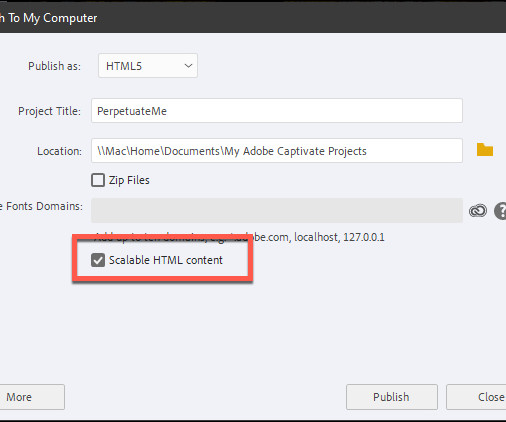
- Adobe Captivate 6: Scalable HTML Content I CAME, I SAW, I LEARNED | TUESDAY, OCTOBER 2, 2012
- Adobe Captivate 5: Nervous About Editing Your RDL? Dupe It. But Watch the Name I CAME, I SAW, I LEARNED | MONDAY, MAY 2, 2011
- Text Animations in Adobe Captivate LEARNING DEVELOPMENTS | TUESDAY, OCTOBER 4, 2011
- Our Thoughts on Articulate Storyline E-LEARNING UNCOVERED | WEDNESDAY, MAY 2, 2012
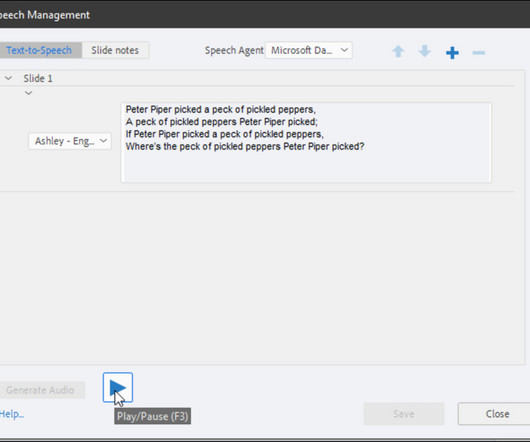
- Text-to-Speech Functionality in Captivate INTEGRATED LEARNINGS | MONDAY, APRIL 11, 2011
- WAR: Articulate Storyline Losing Battle to Adobe Captivate LEARNDASH | TUESDAY, JUNE 12, 2012
- Adobe Captivate 5.5: Show For the Rest of the Project. Or Not I CAME, I SAW, I LEARNED | TUESDAY, JULY 12, 2011
- Adobe Captivate 5 & 5.5: One Simple Click. All That Stands Between You and Your Speech Agent I CAME, I SAW, I LEARNED | TUESDAY, SEPTEMBER 20, 2011
- Embedding Adobe Captivate Recordings in PowerPoint Presentations ADOBE CAPTIVATE BLOG | MONDAY, MARCH 7, 2011
- Adobe Captivate Quirks ICS LEARNING GROUP | WEDNESDAY, DECEMBER 14, 2011
- What I'd like to see in the next Adobe Captivate LEARNING DEVELOPMENTS | TUESDAY, JUNE 4, 2013
- Adobe Captivate: Say Hello to Version 7 I CAME, I SAW, I LEARNED | MONDAY, JUNE 3, 2013
- Adobe Captivate 6: HTML5 At Last! I CAME, I SAW, I LEARNED | WEDNESDAY, JUNE 20, 2012
- Articulate, Captivate, Both, or.? ELEARNING BLENDER | TUESDAY, JANUARY 19, 2010
- New Workflow App for Captivate ADOBE CAPTIVATE BLOG | THURSDAY, NOVEMBER 29, 2012
- An Adobe Captivate Advanced Actions Interaction Example ADOBE CAPTIVATE BLOG | FRIDAY, JULY 15, 2011
- Captivate 6 vs. Articulate Storyline IN THE MIDDLE OF THE CURVE | WEDNESDAY, JULY 11, 2012
- Adobe Captivate: Export Audio I CAME, I SAW, I LEARNED | WEDNESDAY, DECEMBER 7, 2011
- Adobe Captivate: Custom Cursors Anyone? I CAME, I SAW, I LEARNED | TUESDAY, MARCH 20, 2012
- The Secrets of Captivate 6 from Allen Partridge of Adobe Systems ELEARNING TV | MONDAY, OCTOBER 8, 2012
- Writing & Grammar: Checklists, Part III I CAME, I SAW, I LEARNED | TUESDAY, JULY 26, 2011
- Adobe Captivate 6: Hyperlinks within Text Captions I CAME, I SAW, I LEARNED | WEDNESDAY, JULY 11, 2012
- New set of Captivate 5 tutorials from Adobe ADOBE CAPTIVATE BLOG | FRIDAY, FEBRUARY 4, 2011
- Text-to-Speech in Adobe Captivate 5.5 – Create and Reuse! ADOBE CAPTIVATE BLOG | MONDAY, APRIL 23, 2012
- Adobe Captivate: Troubleshooting LMS Woes I CAME, I SAW, I LEARNED | THURSDAY, FEBRUARY 16, 2012
- HTML5 Converter for Adobe Captivate 5.5 is here! ADOBE CAPTIVATE BLOG | TUESDAY, SEPTEMBER 20, 2011
- Adobe Captivate: Using Aggregator I CAME, I SAW, I LEARNED | TUESDAY, SEPTEMBER 14, 2010
- Development Times for Captivate eLearning I CAME, I SAW, I LEARNED | THURSDAY, MARCH 18, 2010
- Adobe Captivate 6: High Fidelity PowerPoint Imports I CAME, I SAW, I LEARNED | WEDNESDAY, AUGUST 22, 2012
- Adobe Captivate 6: Become a Groupie! I CAME, I SAW, I LEARNED | TUESDAY, JULY 17, 2012
- Publish to iPhone – From Captivate 5 and eLearning Suite 2 ADOBE CAPTIVATE BLOG | MONDAY, SEPTEMBER 13, 2010
- Adobe Captivate: A Clean Break from PowerPoint I CAME, I SAW, I LEARNED | WEDNESDAY, FEBRUARY 8, 2012
- Captivate 4 tutorials ADOBE CAPTIVATE BLOG | FRIDAY, APRIL 3, 2009
- Build a Tab Interaction in Captivate 6 ELEARNING BROTHERS | SUNDAY, SEPTEMBER 9, 2012
- Adobe Captivate 5/5.5: Save and Share Effects I CAME, I SAW, I LEARNED | TUESDAY, MAY 1, 2012
- Captivate variables - how to access and control them from external movies. ADOBE CAPTIVATE BLOG | TUESDAY, SEPTEMBER 1, 2009
- Adobe Captivate 7 Templates ELEARNING BROTHERS | FRIDAY, JUNE 7, 2013
- Adobe Captivate 5: Republish and Wait? Not Anymore! I CAME, I SAW, I LEARNED | TUESDAY, NOVEMBER 9, 2010
- Training: Power of Advanced Actions in Adobe Captivate: Tips and Tricks ADOBE CAPTIVATE BLOG | TUESDAY, APRIL 3, 2012
| |